Introduction: Grasshopper Sort List by Volume
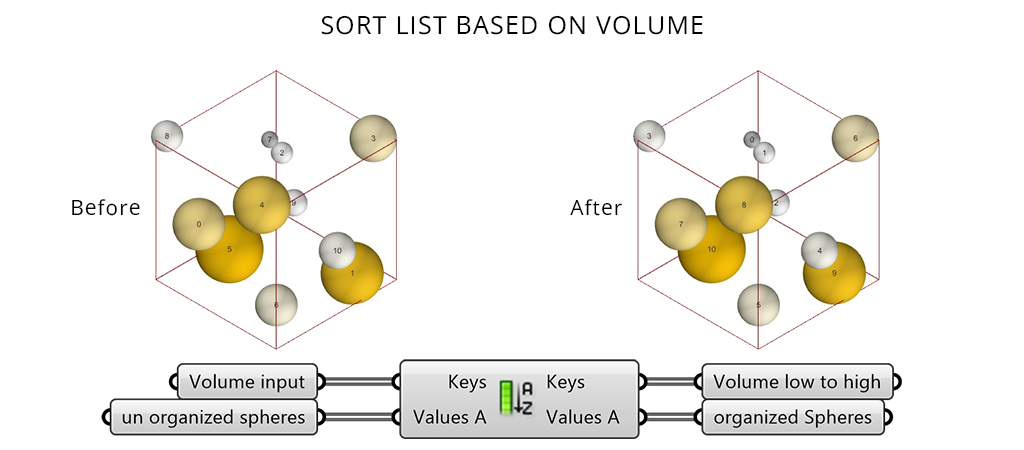
Grasshopper sort list by volume is an essential technique in parametric design for identifying extreme values within a dataset.In any generative workflow, the ability to quickly identify extreme values within a dataset is essential. This tutorial demonstrates a simple yet powerful method to sort geometry by volume in Grasshopper using the Sort List component to organise a random collection of spheres and visually isolate the smallest and largest elements.
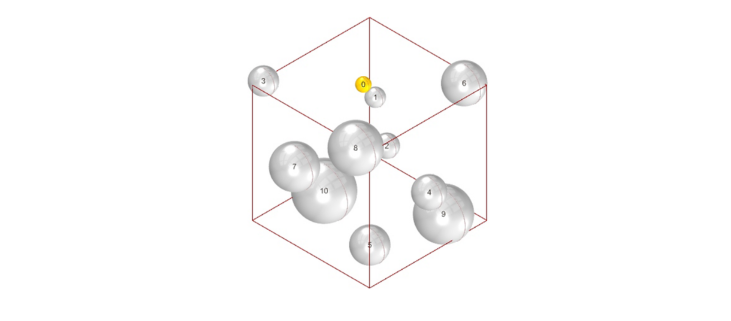
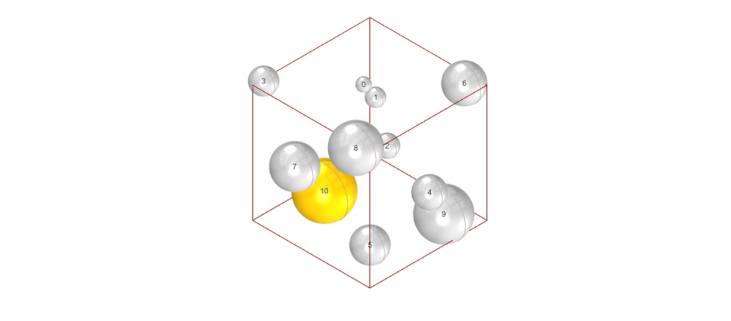
We start with a cube filled with randomly sized spheres. By calculating their volumes and sorting the list, we extract the minimum and maximum elements. The smallest sphere renders in grey with reduced opacity, while the largest stands out in bright yellow, while the rest remain as faint background context.
This Grasshopper sort list by volume technique is directly applicable to architectural focal points, structural analysis, and any scenario where highlighting data extremes matters. No scripting—just clean, logical steps.
Let’s begin.
Smallest Volume Sphere in Grasshopper
Once the spheres are generated and their volumes calculated, the goal is to sort the list by volume in Grasshopper so the smallest element sits at a predictable index and can be easily extracted.
Components: Volume / Sort List / List Item
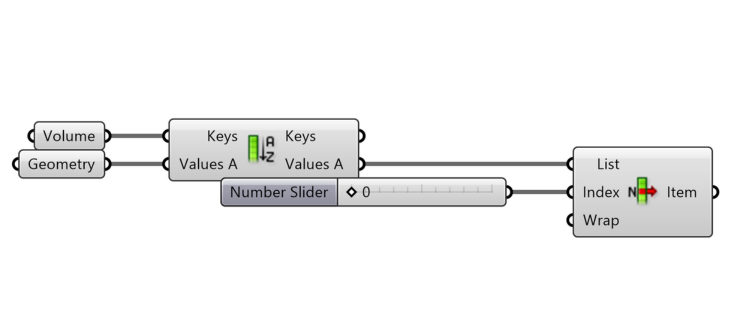
Step-by-step
Compute the volumes – Use the Volume component. Connect the sphere geometry to its G (Geometry) input. The V (Volume) output returns a numeric value for every sphere in the set.
Sort spheres by volume – Add a Sort List component.
- Connect the Volume (V) output to the K (Keys) input. This list of numbers determines the sort order.
- Connect the original list of spheres to the A (List to sort) input.
- The A output now delivers all spheres, reordered from smallest volume (index 0) to largest.
Extract the smallest – Add a List Item component.
- Connect the sorted spheres from Sort List (A) to the L (List) input.
- The default index i = 0 returns the smallest sphere.
That’s it. The smallest sphere is isolated and ready for downstream operations.
Selecting the Largest Volume Sphere
The process mirrors the smallest sphere extraction, but targets the opposite end of the sorted list of geometry in Grasshopper.
After sorting spheres by volume using Sort List, the largest sphere sits at the last index.
To extract it:
- Use a List Item component with the same sorted list
- Set index i = -1 (last item), or
- Use List Length – 1
You now have the sphere with the maximum volume isolated. No extra sorting required—the same ordered list works for both extremes.
Real-World Application: Volume-Based Decision Making
In large-scale architectural and urban projects, comparing and organizing volumes plays an important role in guiding design decisions. Instead of treating all elements equally, designers evaluate parts of a project based on size, impact, and function.
Case Example: BIG U Project
-
The BIG U project is a large urban intervention divided into multiple segments along the waterfront. Each segment varies in scale, function, and complexity.
Designers typically:
- Compare zones based on size and importance
- Prioritize larger intervention areas
- Break projects into manageable phases
This naturally involves sorting and evaluating volumes, similar to what we achieve in Grasshopper.

Connecting to Parametric Workflows
-
In parametric design, this same logic is applied using tools like Sort List in Grasshopper.
By sorting geometry based on volume, designers can:
- Identify largest and smallest elements
- Establish hierarchy in design
- Control selection and modification
This helps structure complex datasets into meaningful design logic.
Conclusion
-
Sorting geometry by volume in Grasshopper transforms a random collection into an organized system. By arranging elements from smallest to largest, designers can quickly identify key components and make informed decisions.
This method is especially valuable in parametric workflows, where large datasets need clear structure and control. Whether used for selection, filtering, or optimization, the Grasshopper Sort List workflow enables precise and intelligent design processes.